


4.2705.50K Reviews
App Specs
- Version
- Varies with Device
- Updated On
- License
- Free
- Downloads
- 1,000,000,000+
- Developer
- Categories
- Lifestyle
- Platform
- Android, iOS
Screenshots



 Analysis by AppCompare
In my first few days with Pinterest, I found it easy to slip from one idea into another: a dinner recipe leads to a kitchen-organizing tip, then to a color palette I want to save for later. That quick spark is the app’s strongest first impression. The harder question is whether it stays useful once the novelty of browsing wears off. For me, it does when I treat it as a place to collect ideas for real plans, rather than as an endless feed to check whenever I’m bored.
From first-week discovery to lasting inspiration
I find Pinterest most rewarding when I give browsing a purpose: collecting a few references for a meal, room update, or other decision I expect to make. In this section, I’ll look at how that early discovery can become a habit that still pays off later, and where a little organization makes the difference between useful inspiration and an unsearchable pile.
Why the first scroll feels rewarding
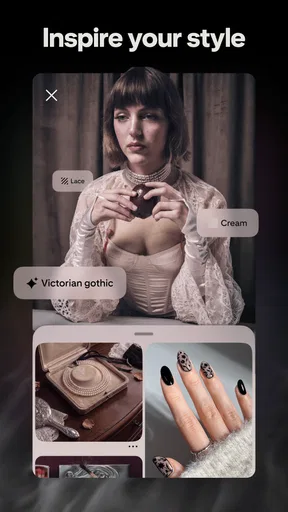
The feed gives visual browsing a very different feel from a conventional web search. Instead of starting with a precise question, I can scan images and notice styles or approaches I would not have thought to search for. That works especially well when I am at the vague beginning of a project: I might know I want to refresh a room, but not whether I am drawn to warm wood, softer colors, or a more practical layout. Seeing examples helps me turn that uncertainty into a direction.
Guides and Analysis on Pinterest
The app is a lifestyle product developed by Pinterest, and its scale means there is a broad range of subjects to explore. It has a 4.3 average from around 11 million ratings and has passed 1 billion installs, but popularity alone is not the reason I would keep it. The useful part is how quickly I can move from browsing into collecting references that I can revisit when I am ready to act.
Easy to navigate, but better with a little structure
The search function is useful when I have a specific subject in mind, while the home feed is better for open-ended discovery. I can save pins to boards, which gives me a simple way to separate, for example, weeknight meals from a room project or a clothing idea. My practical tip is to make boards around decisions I expect to make, not just broad interests. A board called “small entryway storage” is easier to use later than one that collects every home idea I have ever liked.
Saving something is not the same as deciding to do it. I try to keep a board focused enough that I can compare a handful of useful references instead of wading through a scrapbook of unrelated images. When a project is underway, I can also use board sections or separate boards to distinguish inspiration from ideas I have actually shortlisted. That extra sorting takes a little effort, but it reduces the common problem of remembering that I saved something without remembering where it went.
Useful for projects, less useful as a substitute for research
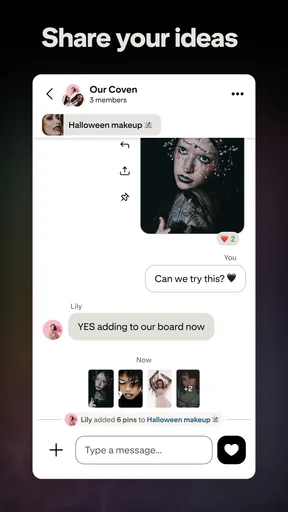
The app is at its best when pictures help me explain what I mean. If I am planning a birthday table, I can collect examples of colors, decorations, and food presentation in one place, then show the board to someone helping me. For a home update, a group board can give collaborators a shared visual reference rather than a long exchange of screenshots. Following people and commenting can add a community element, though I see that as secondary to the practical value of saving and comparing ideas.
Worth Reading Before You Choose

Switching to Android Auto Means Rethinking Your Driving Routine

Google Calendar Makes a Crowded Week Easier to Manage

Baby Panda World Brings Quick Play to Modern Phones, but Its Game Library Feels Busy

ESPN’s Live Game View Makes Following Close Games Easier

QuizzLand Review: A Good Fit for Short Trivia Breaks, Not Every Player

Basketball Stars: Multiplayer Is Fast, but Can It Recover When Matches Go Wrong?
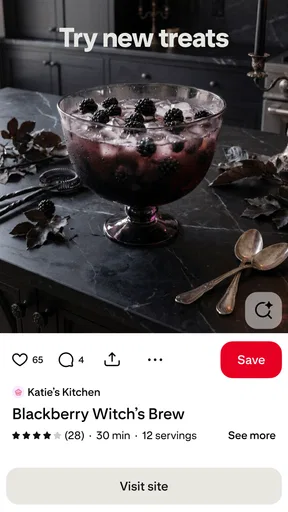
There is an important limit: a striking image may show an outcome without explaining its cost, durability, dimensions, or difficulty. I would use pins to identify possibilities, then check the original source and do separate research before buying materials or following instructions. For recipes, I would read the full method and judge whether it fits my ingredients and equipment; for furniture or décor, I would confirm measurements rather than trusting the image to tell the whole story. That distinction keeps inspiration helpful instead of letting it stand in for verification.
Lens and shopping: good starting points, not final answers
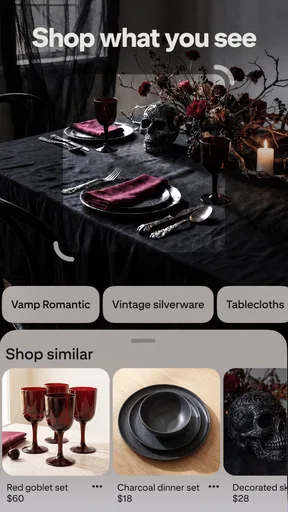
The Lens feature lets me use a camera image to look for visually similar pins. I find that most useful when I can see an object or style but do not know the right words to describe it. It can help me explore related looks or find a starting point for a search, although visual similarity does not guarantee that a result is the same item, a reliable recommendation, or an exact match. I treat it as a discovery shortcut, not as a promise of identification.
Shopping links can be convenient when a pin points toward an item or a similar product, but they also change the mood of browsing: an idea can quickly become a purchase prompt. I would compare the item elsewhere and check whether it genuinely suits my needs before buying. Pinterest is free to download, with in-app purchases listed from about $5.88 to $41.17 per item; I would not assume that paying is necessary to get value from ordinary idea-saving and discovery. Its content rating is Teen, so families should consider that when deciding whether it is appropriate for a younger user.
Where it fits among other ways to find ideas
Compared with a general search engine, Pinterest is more visual and better for gathering examples in one place, while a search engine is usually the more direct route when I need a factual answer, current details, or a specific source. Compared with image-heavy social feeds, boards make it easier to return to a theme later instead of relying on a post passing through my feed at the right moment. That does not make it a replacement for every other tool: a notes app is often better for measurements, deadlines, and decisions, and a dedicated shopping service is more useful when I already know exactly what I want to buy.
I would recommend it to people who plan visually, enjoy collecting references, or often need to turn a loose idea into a shortlist. It is also handy for shared projects when everyone benefits from looking at the same examples. I would skip it, or keep it at arm’s length, if I want quick factual answers, dislike image-led browsing, or know that an open-ended feed tends to absorb more time than I intend to give it.
Keeping the habit useful instead of tiring
The main maintenance burden is organizational rather than technical: boards only help if I can find the right one later. I do not need to curate every save, but occasionally removing ideas that no longer fit a project makes a board more useful. A small workflow works well for me: save freely while exploring, move the strongest candidates into a focused board, and revisit that board when I am ready to make a decision. It creates a bridge from browsing to action without turning the app into another task manager.
The same personalized feed that makes the first week engaging can also become repetitive or encourage aimless scrolling. When I notice that I am saving near-identical ideas without learning anything new, I switch to a specific search or leave the app and work from the references I already collected. I also avoid treating every attractive pin as a plan. A saved image is most valuable when I can say what it helps me decide; otherwise, it is just another item in a growing pile.
Endless Inspiration at Your Fingertips
When you first open Pinterest, you're greeted with a visually stunning feed tailored to your interests. Whether you're into DIY crafts, fashion, home decor, or delicious recipes, there's something for everyone. The app's algorithm seems to know exactly what you want to see, which makes it incredibly addictive. I found myself constantly discovering new ideas that I couldn't wait to try out.
Easy to Navigate
One of the things I love about Pinterest is its user-friendly interface. Everything is organized neatly, making it easy to search for specific topics or simply browse through your feed. The app's search function is robust, allowing you to find pins, boards, and even people with similar interests. You can create your own boards to save and organize your favorite pins, which is perfect for someone who loves to keep things tidy.
Collaboration and Community
What's really cool is the community aspect of the app. You can follow other users, comment on pins, and even collaborate on group boards. This feature is fantastic for sharing ideas with friends or working on a project together. It's like having a creative social network where everyone shares the same passion for discovery and innovation.
Unique Features
Pinterest also offers a “Lens” feature, where you can use your camera to snap a picture of something you like, and the app will find similar pins. It's a fun way to explore new ideas based on real-world inspiration. Plus, the app regularly updates with new features and improvements, keeping the experience fresh and engaging.
Another highlight is the ability to shop directly through the app. If you find something you love, Pinterest often provides links to purchase similar items. It’s like having a personal shopper at your fingertips!
Final Thoughts
Overall, Pinterest is a fantastic app for anyone looking to spark creativity and find inspiration. It's easy to lose track of time while exploring all the beautiful content it offers. Whether you're planning a wedding, redecorating your home, or just looking for a new recipe, Pinterest has got you covered. It's more than just an app; it's a gateway to a world of endless possibilities. Give it a try and see where your imagination takes you!
Pros
- Vast collection of creative ideas.
- User-friendly interface for easy navigation.
- Personalized content recommendations.
- Seamless integration with other apps.
- Regular updates with new features.
Cons
- Requires an account to save pins.
- Can be addictive and time-consuming.
- Occasional irrelevant content suggestions.
- Limited offline functionality.
- Some features locked behind a paywall.
FAQs for Pinterest
What is Pinterest and how does it work?
Pinterest is a visual discovery engine for finding inspiration on various topics such as fashion, recipes, and home decor. Users can browse and save ideas by creating 'boards' where they 'pin' images or videos. It’s a platform to explore new interests, collect ideas, and share your own creations.
Is Pinterest free to use?
Yes, Pinterest is free to download and use. There are no subscription fees, and you can access most features without any cost. However, Pinterest does offer some paid advertising options for businesses looking to promote their content to a larger audience.
Can I use Pinterest without an account?
While you can browse Pinterest without an account, signing up allows you to save pins, create boards, and engage with the community. An account provides a personalized experience, enabling you to follow other users and receive recommendations based on your interests.
How does Pinterest ensure user privacy and security?
Pinterest prioritizes user privacy and offers various settings to control your experience. You can manage your account visibility, control who sees your boards, and adjust ad preferences. Pinterest also adheres to strict security protocols to protect your data from unauthorized access.
Can I use Pinterest for business purposes?
Absolutely. Pinterest offers business accounts with features tailored for marketing and brand growth. These include analytics tools, promoted pins, and the ability to create 'Rich Pins' that offer more context about an idea. Businesses can drive traffic and engagement by showcasing products or services creatively.


